

 Before
 After
After🇺🇸 UNITED STATES · UPDATED 2026
US Passport Photo Maker — 2×2 in, White Background
Make a US passport photo online. Official 2x2 inch size (51x51mm, 600x600px) on a plain white background. Meet every State Department requirement here.
Drag & drop or click to upload
JPG, PNG or WEBP
- Checked against the official travel.state.gov 2x2 in spec
- Plain white background, no shadows or gradients
- Print-ready 600×600px file — no photo studio needed
OFFICIAL SPECIFICATION
United States passport photo requirements
| Requirement | Value |
|---|---|
| Physical size | 50.8 x 50.8 mm |
| Digital photo size | 600 x 600 px |
| Background | #FFFFFF |
| Head height | 25-35 mm (50-69% of frame height) |
RULE HISTORY
Why the 2016 glasses ban still trips up US passport photos
Since November 1, 2016, the State Department has refused any passport photo showing glasses — prescription, non-prescription, or sunglasses, with no blanket exemption. Before that date, clear lenses were fine as long as there was no glare, so travelers renewing after a long gap are sometimes caught off guard by a rule nobody told them had changed.
The change closed off a single, specific failure mode: lens glare and frame shadows accounted for roughly 20% of all returned photos at the time, according to State Department reporting, and removing eyewear from the frame ended the ambiguity in one move. Anyone who genuinely cannot remove glasses needs a documented medical exception, covered next. If you wear glasses every day and worry about looking different from your photo, note that border officers are trained to identify travelers with or without them — a passport photo is not required to match your everyday look on that point.
A medical exception to the no-glasses rule requires a signed statement from your doctor submitted with the application — simply noting that you 'always wear glasses' is not enough without a doctor's signature confirming a medical reason you cannot remove them for the photo.
HOW IT WORKS
Three steps to a compliant United States photo
Upload a photo
Any recent, front-facing photo works — the tool handles the background and framing for you.
AI matches the spec
Background is replaced with an even #FFFFFF and the crop is adjusted to the 50.8x50.8mm frame, without altering your face.
Check compliance and download
Your result is measured against the United States pixel size, DPI, and head-height ratio before you download it.
US passport photo cost — retailer vs. at home
| Where | Price | Notes |
|---|---|---|
| Walgreens | $16.99 | Two prints, walk-in, no appointment needed |
| CVS | $17.99 | Two prints, walk-in |
| Walmart | $7.64 | Cheapest pharmacy option for two prints |
| USPS | $15.00 | Appointment required at participating post offices |
| Costco (limited) | $4.99 where offered | Most locations dropped photo services in 2021; only ~300 of 600+ warehouses still have one, membership required |
| faceroom.app (at home)Includes compliance check | Under $1 | 4x6in retail print + free online edit |
Renewing online? Get a compliant 600x600px photo without leaving home
Upload any recent photo above — background, crop, and color space are matched to the travel.state.gov spec before you download.
SEE IT WORKING
Real editing, fictional people
These examples use AI-generated, fictional people so we never publish anyone's real photo — the editing shown is exactly what the tool does to your own upload.
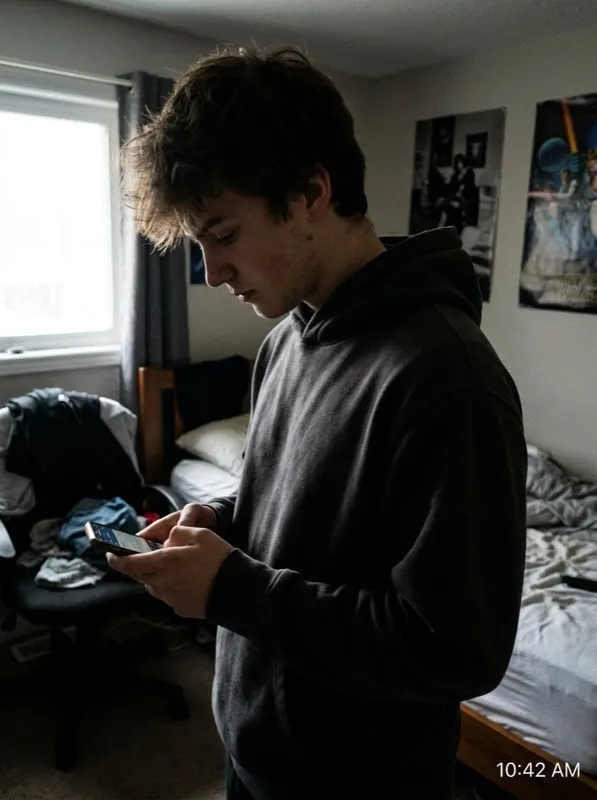 Before
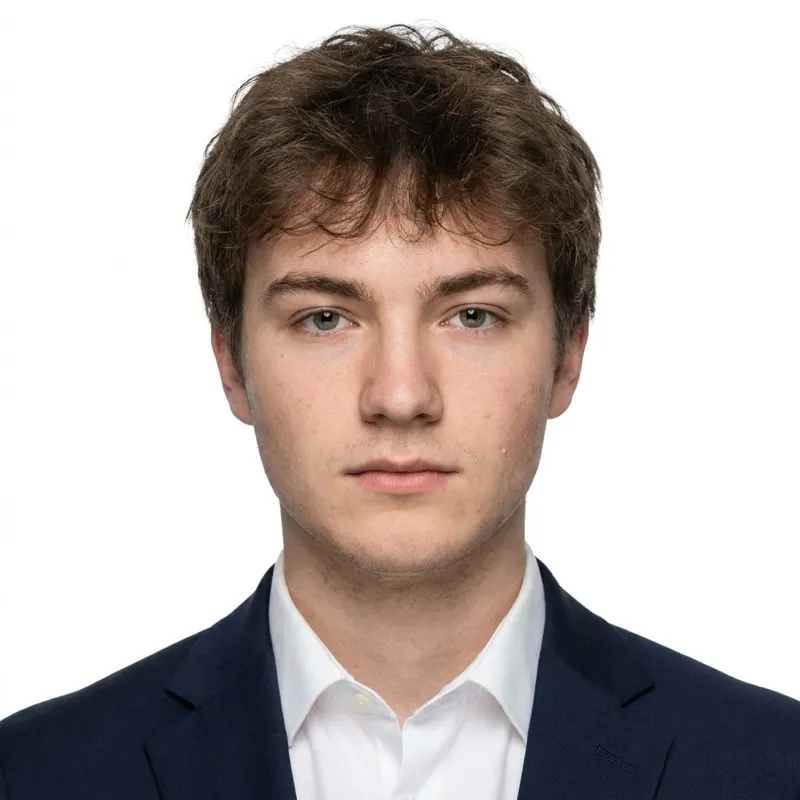 After
AfterOnline renewal vs. mail-in — what actually changes in the photo file
| Requirement | Online renewal (MyTravelGov) | Mail or in-person |
|---|---|---|
| Format | Digital JPEG upload | Two identical prints |
| Pixel size | 600x600 to 1200x1200px, square | No pixel requirement — physical 2x2in print |
| File size | 54KB-10MB | N/A — photo paper, not a file |
| Color space | sRGB, 24-bit color (iPhones often default to Display P3 and need converting) | N/A — printed on glossy or matte photo paper |
| Who can use it | Adult 10-year passport, expired or expiring within 1 year, no detail changes | Anyone — required for first-time applicants, minors, or a detail change |
| If the photo is rejected | Upload a new digital photo directly through the MyTravelGov portal | Mail two new printed photos to the address given in the rejection notice |
RULES TO GET RIGHT
United States photo rules beyond the size
- Photo must be exactly 2x2 inches (51x51mm) when printed, or 600x600 pixels for digital submissions.
- Background must be plain white or off-white — no patterns, shadows, or gradients.
- Head height (bottom of chin to top of head including hair) must be between 1 inch and 1⅜ inches (25-35mm).
- Glasses are not allowed — this rule has been in effect since November 2016. The only exception is a documented medical reason with a signed doctor’s statement.
- Neutral expression with both eyes open and mouth closed, looking directly at the camera.
- Photo must be taken within the last 6 months and reflect your current appearance.
- Head coverings are allowed only for religious reasons, and your full face must remain visible from hairline to chin.
Baby / infant photo rules
For a baby's US passport photo, the same 2x2 in white-background format applies. The baby's eyes do not need to be open, and no neutral expression is required. Photograph the baby alone on a plain white sheet from above — no toys, pacifiers, hands, or other people visible. See the [baby passport photo](/baby-passport-photo) page for detailed tips.
Printing
A 4x6 in photo sheet fits 4 copies of a 2x2 in (51x51mm) US passport photo.
At home / online
~$0.35 per photo printed at home or at a retail kiosk on 4x6 photo paper
In-store studio
$14.99-16.99 at CVS, Walgreens, or similar pharmacy/retail store
US passport photo do's and don'ts
Do
- Use a plain white or off-white background with no shadows
- Keep a neutral expression, mouth closed, both eyes open
- Take the photo within the last 6 months
- Wear a head covering only for religious reasons, keeping your full face visible
- Verify a self-taken retake against a compliance checker before mailing it in
Don't
- Wear any glasses — prescription, non-prescription, or sunglasses — without a signed doctor's statement
- Upload a digital photo outside sRGB color space
- Reuse a printed 2x2in photo for an online renewal upload — the pixel spec is different
- Smile or leave your mouth open
- Assume a photo taken more than 6 months ago still qualifies just because you look the same
FAQ